catalogue ads, but designed
Stop advertising the bare product image in your catalogue ads.
Your feed already pushes a catalogue ad but it's usually just the product on white. Curate uses your product data combined with manual elements you add to turn your catalogue ads into something people stop on. One template to bulk generate for as many SKUs as you need.
standard feed ad
- Packshot on white, nothing else
- No sale price, no offer, no brand
- Looks identical to every competitor
rendered by curate — same feed row
- Sale price, offer badge and your logo, per SKU
- Uses the extra PDP images your feed already has
- Re-skin the same feed for any moment in the calendar
csv · tsv · json in · png renders + feed url out · free tier, no card
§ 01 — occasions
Always-on templates, plus one for every moment worth marking.
- always onAlways-onrun several
- −20% · ends sundayBlack Friday% off badge
- just landedNew launchmulti-image
- top 20Best sellerstop-20 badge
- back in stockRestockback-in-stock flag
- 9:16 · storySeasonal editcollection run
These are looks, not a fixed library: start from the six starter templates and build your own on top — several business-as-usual looks running year-round, a seasonal skin when there's a moment to mark, and a version per market where the currency or the message changes. You only pay for the images you generate.
§ 02 — how it works
Three steps, then point your catalogue at the feed.
Set the flow up once and re-run it whenever the feed moves. When new prices or new products land, only the SKUs that changed are rendered again.
- step · 01
Connect your feed
Drop a CSV, TSV or JSON and point each column at the field it fills — once. Columns already named like Curate's fields map themselves.
titlenamepricepricesale_pricesalePricehero_imgimageUrl - step · 02
Design the ad once
Lay out type, shapes, badges and your logo — then bind the layers that should change per product.
{name}{salePrice}logo · static - step · 03
Render the catalogue
One run renders every SKU at your chosen ratio — 4:5, 1:1 or 9:16 — up to 4096px.
- 1080×1350 · 4:5 png
- 3,214
- csv / json with every image url
- 1
- public feed url
- 1
§ 03 — what fills in, what stays put
Half the template is your brand. Half is your catalogue.
pulled per product
- Product title
- Price
- Sale price
- Main image
- Additional PDP images
- Cutout image
Prices change, photos get swapped, products sell out — re-run and every image is current.
set once, stays fixed
- Logo
- Borders
- Shapes
- Offer badges
- Your typeface
- Palette
Save the template, your fonts and your logo to your library and reuse them across every drop — or every client project, if you're an agency.
Optional: let AI cut out backgrounds or draft channel copy. Useful — but not the point.
§ 04 — real templates
This is what your template could look like.
Built once, then generated across the catalogue. The tags under each one are the fields doing the work.
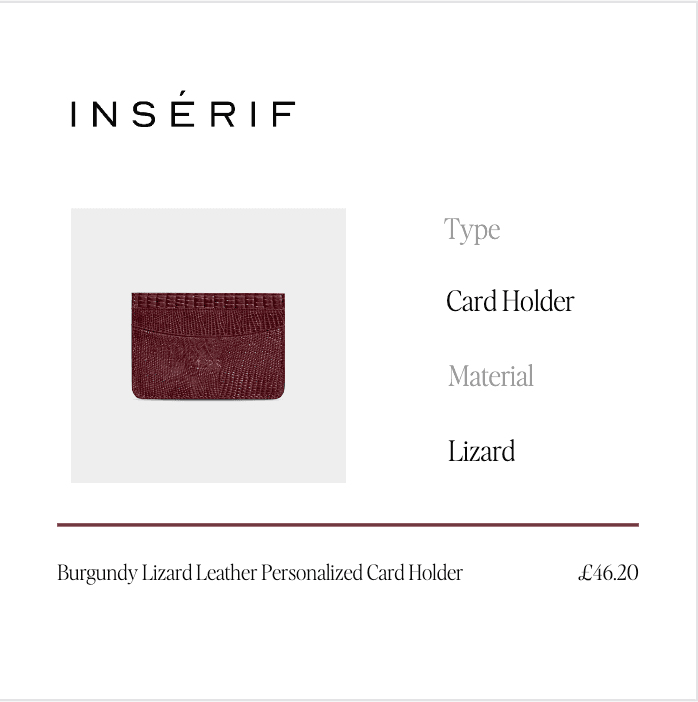
Spec panel
1:1 · feed + product taxonomy
titlepricemain imageproduct typematerial · taglogo · staticrule · static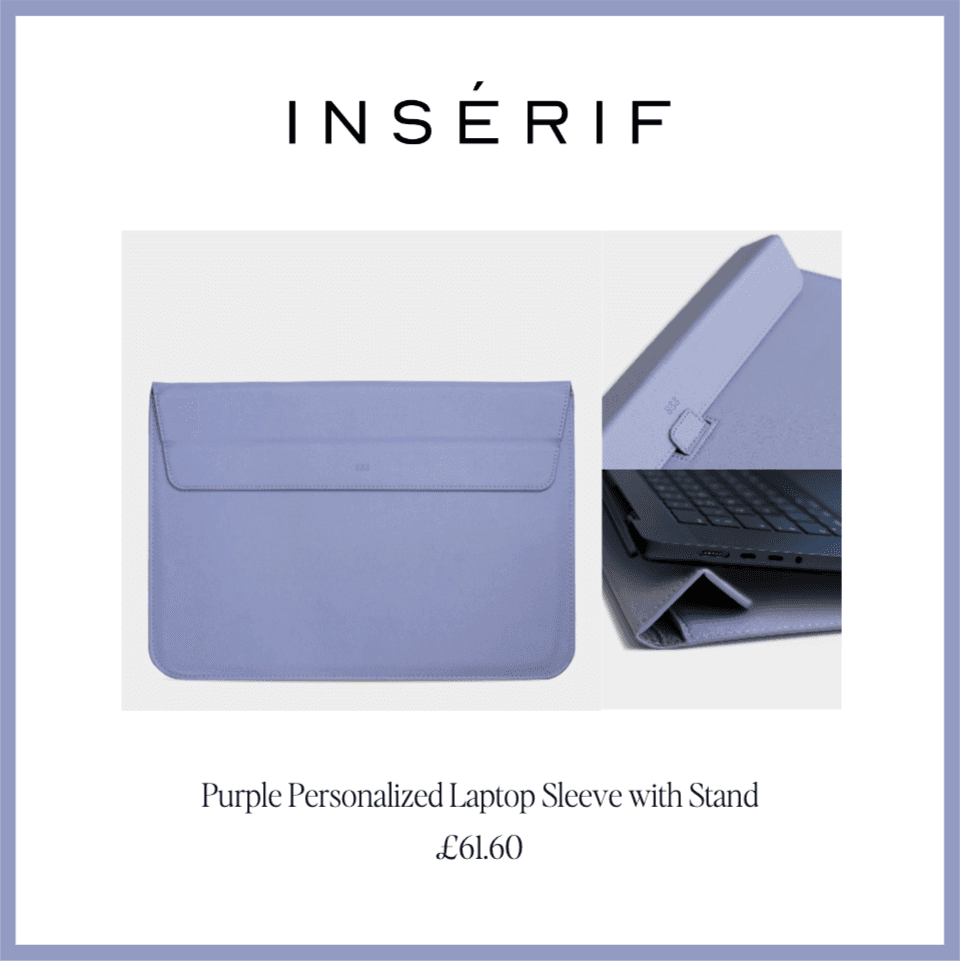
Framed multi-image
1:1 · border keyed to a product tag
titlepricemain imagepdp images ×2border · from taglogo · static
Lifestyle split
1:1 · lifestyle + detail crop
titlepricemain imagepdp imagecategory · taglogo · staticbackdrop · static
purple tags = pulled from your feed · pink = styled from a feed tag · grey tags = set once in the template
§ 05 — pricing
Pay for renders, not seats.
One rendered image is 1 token. Background removal is 2 per image, AI copy 20 per product and an AI-generated template 25. Tokens refresh at the start of each month.
Free
try it on your own feed
$05 tokens / mo
- All 6 starter templates
- Every feature, token-limited
- Enough to connect your feed and try the editor
- No card required
Local
for solo shops
$400/moor $4,080/yr — save 15%
4,500 tokens / mo
- Render the whole catalogue, every month
- Headroom for AI templates, cutouts & copy
- Custom fonts & saved libraries
- CSV / TSV / JSON + public feed URL out
- most popular
Pro
for growing catalogues
$670/moor $6,120/yr — save 24%
10,000 tokens / mo
- Render the whole catalogue, every month
- Headroom for AI templates, cutouts & copy
- Custom fonts & saved libraries
- CSV / TSV / JSON + public feed URL out
Global
for high volume
$1,340/moor $13,680/yr — save 15%
20,000 tokens / mo
- Render the whole catalogue, every month
- Headroom for AI templates, cutouts & copy
- Custom fonts & saved libraries
- CSV / TSV / JSON + public feed URL out
prices in usd · no plan locks a feature — plans differ only in monthly tokens · cancel anytime
§ 06 — before you ask
- Do I need a designer?
- No. Start from one of the six starter templates, drop your logo and colours in, and bind the layers to your feed columns. The layout holds itself together across products.
- What counts as a token?
- One rendered image is 1 token. You see the cost of a run before you commit to it, and tokens refresh at the start of each month.
- Is this only for sales and seasonal pushes?
- No. Brands run several business-as-usual templates against their feed all year — plus a version per market where the currency or message changes — and add a seasonal skin when there's a moment to mark. Only the images you generate count.
- Is there a free plan?
- Yes — 5 tokens every month, no card needed. Upgrade when you want more tokens — paid plans cancel anytime.
Input your product data source and build your first template to launch within the next 60 minutes.
5 free tokens every month, no card — enough to connect your feed and try the editor. Upgrade when you're ready to render the catalogue and test it against your usual creative.
$0 to start · cancel anytime · export your data whenever you like